

Your Xbox Series X or Series S powers on. The light is on, the fan spins, maybe you even hear the startup sound, but the TV says “No Signal” or just stays black. It’s one of the most common problems we see on the bench, and it has a handful of very different causes: some you can fix in five minutes at home, and some that need a microscope and a soldering station.
This guide walks through how to tell them apart: the quick checks to rule out the cable, TV and settings, what it means when the HDMI port itself is damaged, and why “no signal” on an Xbox is sometimes caused by tiny parts most people have never heard of, like the ESD protection diodes and the traces that connect the port to the board.
First, is the Xbox actually working?
Before blaming the HDMI port, confirm the console is really booting. A few signs that it is:
- The power light stays on steadily instead of flashing or shutting off.
- The fan runs and you hear the normal startup chime.
- Your controller connects (its Xbox button stops flashing and goes solid).
- The console shows up as online in the Xbox app on your phone, if you’ve set that up.
If all of that happens and you still get no picture, the problem is almost certainly somewhere between the console’s video output and your screen. If the console turns off by itself, won’t power on, or the light behaves strangely, that’s a different problem (power or overheating) and a different repair.
Quick checks you can do at home
These take a few minutes and rule out the most common non-repair causes:
- Try another HDMI cable. Use the cable that came with the console if you still have it, or another known-good high-speed HDMI cable. Cables get pinched behind TV stands more often than you’d think.
- Try another HDMI input on the TV, and then another TV or monitor. Make sure the TV is set to the correct input. If it works on a different screen, the console is fine and the issue is the TV, its settings, or a receiver or soundbar in between.
- Go direct. If the Xbox runs through a receiver, soundbar, capture card or HDMI switch, plug it straight into the TV to take those out of the picture.
- Do a full power cycle. Hold the power button on the front of the console for about 10 seconds until it shuts down completely, unplug the power cord for a minute or two, then plug it back in and start it again.
- Reset the display settings. If the console was set to a resolution or refresh rate the TV doesn’t accept, you can get a black screen even though nothing is broken. Microsoft’s support site describes how to start the console in a low-resolution mode using a button combination on the console itself, then set the display options again. Follow Microsoft’s current steps for your model.
- Look at the HDMI port with a flashlight. With the console unplugged, look straight into the HDMI port on the back. You’re looking for bent or missing pins, a port that’s crooked or loose, or a port that wiggles when you touch the cable. Don’t poke at it with anything metal.
If a different cable, TV and settings all fail, and especially if you can see damage in the port, it’s time to look at the hardware.
Cause 1: a damaged HDMI port
The HDMI port is soldered directly to the Xbox motherboard. It takes a lot of stress: consoles get moved, carried in bags, knocked off TV stands, and cables get yanked when someone trips over them. Any of that can bend the pins inside the port, crack the port’s housing or break the solder joints that hold it to the board.
A loose or damaged port often shows up as a picture that cuts in and out when you touch the cable before it stops working entirely. If you remember the screen flickering or dropping out for a while before it went black, the port is a strong suspect. Replacing the port is a board-level job: the old connector is removed, the pads are cleaned and checked, and a new port is soldered in and tested.
Here’s what that looks like on one of our Xbox Series no-signal repairs:
Cause 2: lifted pads and broken traces
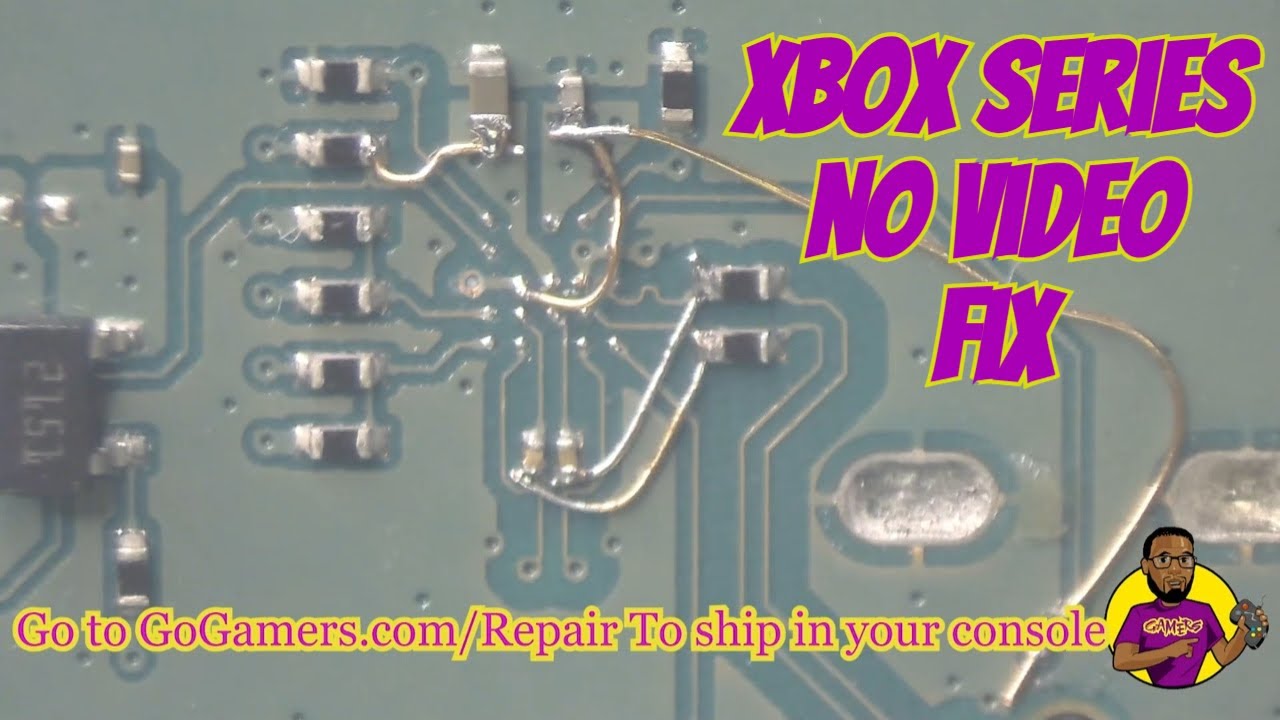
When an HDMI port gets hit hard or ripped partway off, it can take pieces of the board with it. The small copper pads the port is soldered to can tear off, and the thin copper lines (traces) that carry the video signal from the port into the board can break. This also happens a lot after an earlier repair attempt that used too much heat or force.
In that case, a new HDMI port alone won’t fix the console, because there’s nothing solid left to connect it to. The repair means rebuilding those connections first: exposing the remaining trace, bridging it with fine jumper wire, and securing everything so the new port has a reliable connection for every signal line. It’s slow, careful work under a microscope, and it’s very repairable in most cases. This Series S came in with exactly that kind of damage:
Cause 3: the ESD protection diodes
Between the HDMI port and the chips that generate the video signal, Xbox Series consoles have small protection components designed to absorb static electricity and voltage spikes, such as a static shock, a surge through a connected device, or a cable plugged in while something else was faulty. These are often called ESD diodes or a diode pack.
When they do their job one time too many, they can fail shorted. A shorted protection diode can kill the video signal even though the HDMI port itself looks perfect. That’s why some Xboxes come in with a clean, undamaged port and still show no signal. Finding it means testing the signal lines on the board, not guessing. In the video below, the failed diode pack on an Xbox Series X is identified and dealt with to bring the picture back:
Cause 4: the video chip or a deeper board fault
Less often, the problem is further into the board: a damaged chip in the video path, or damage from liquid, a power surge or a previous repair. These cases take more diagnosis, and they’re the main reason we test the board before quoting a repair. Replacing a port on a console with a deeper fault just means paying twice.
What not to do
- Don’t force a cable into a damaged port. If the cable doesn’t slide in smoothly, pushing harder can lift the port further off the board and turn a simple repair into a trace repair.
- Don’t keep wiggling the cable to get a picture. Every wiggle stresses the solder joints that are already failing.
- Don’t try a heat gun or hair dryer. Uneven heat can lift pads, damage nearby chips and warp plastic.
- Don’t buy a port and try to swap it without the right tools. HDMI ports have many small pins, and modern boards pull heat away fast. Most of the trace repairs we do started with an at-home or quick-shop attempt.
How we diagnose an Xbox with no signal
- Confirm the symptom on our own known-good screens and cables, and ask what happened before it stopped (a drop, a move, a storm, a previous repair).
- Inspect the port and board under magnification for bent pins, cracked solder, lifted pads and broken traces.
- Test the signal path, including the protection diodes, to find exactly where the video signal stops.
- Repair at the component level: a new HDMI port, rebuilt traces, a replaced or bypassed failed component, or whatever the test shows is needed.
- Test it running before it goes back: picture at normal settings, sound, controller connection and a stable run time.
Many of these repairs end up on the Go Gamers YouTube channel, so you can see the kind of work involved. For more write-ups, browse our repair guides.
Is it worth fixing?
In most cases, yes. A no-signal Xbox is usually a working console with one broken link in the video path, and fixing that link keeps your console, your settings and everything installed on it. We’ll tell you what we find before doing the repair, and if it can’t be fixed, you’ll know that up front too.
Xbox no-signal repair in Omaha and Lincoln, or by mail
Omaha: bring it to our Omaha location for same-day repair. Questions? Call or text (402) 703-4403. Diagnosis is free, and if the console can’t be repaired there’s a $40 fee.
Lincoln: bring it to Game Repair Shop inside Gamers in Lincoln at 2711 King Ln, Ste 202 (Mon–Wed 12–7, Thu–Sat 12–8, Sun 12–7). The $25 drop-off fee is credited toward your repair, and turnaround is 3–5 days.
Farther away: see options for out-of-town customers, or mail it in (free diagnosis, $40 if it can’t be repaired, 3–5 days after arrival). Every repair carries a 30-day limited warranty.
We repair every Xbox, from Series X and Series S HDMI and power problems to Xbox One and 360. See Xbox repair for everything we do.